<!DOCTYPE html>
	<html lang="vi" xmlns="http://www.w3.org/1999/xhtml" prefix="og: http://ogp.me/ns#">
	<head>
<title>Hướng dẫn 2k4 cách đăng ký nguyện vọng xét tuyển đại học trực tuyến</title>
<meta name="description" content="Hướng dẫn 2k4 cách đăng ký nguyện vọng xét tuyển đại học trực tuyến - Savefile - Tin Tức -...">
<meta name="author" content="Trường Đại học Bình Dương">
<meta name="copyright" content="Trường Đại học Bình Dương [info@bdu.edu.vn]">
<meta name="robots" content="index, archive, follow, noodp">
<meta name="googlebot" content="index,archive,follow,noodp">
<meta name="msnbot" content="all,index,follow">
<meta name="generator" content="NukeViet v4.3">
<meta name="viewport" content="width=device-width, initial-scale=1">
<meta http-equiv="Content-Type" content="text/html; charset=utf-8">
<meta property="og:title" content="Hướng dẫn 2k4 cách đăng ký nguyện vọng xét tuyển đại học trực tuyến">
<meta property="og:type" content="website">
<meta property="og:description" content="Savefile - Tin Tức - https&#x3A;&#x002F;&#x002F;bdu.edu.vn&#x002F;savefile&#x002F;thong-bao&#x002F;huong-dan-2k4-cach-dang-ky-nguyen-vong-xet-tuyen-dai-hoc-truc-tuyen-616.html">
<meta property="og:site_name" content="Trường Đại học Bình Dương">
<meta property="og:url" content="https://bdu.edu.vn/thong-bao/huong-dan-2k4-cach-dang-ky-nguyen-vong-xet-tuyen-dai-hoc-truc-tuyen-616.html">
<link rel="shortcut icon" href="https://bdu.edu.vn/favicon.ico">
<link rel="canonical" href="https://bdu.edu.vn/thong-bao/huong-dan-2k4-cach-dang-ky-nguyen-vong-xet-tuyen-dai-hoc-truc-tuyen-616.html">
<link rel="alternate" href="https://bdu.edu.vn/rss/" title="Tin Tức" type="application/rss+xml">
<link rel="alternate" href="https://bdu.edu.vn/rss/tin-tuc-su-kien/" title="Tin Tức - TIN TỨC – SỰ KIỆN" type="application/rss+xml">
<link rel="alternate" href="https://bdu.edu.vn/rss/thong-bao/" title="Tin Tức - THÔNG BÁO" type="application/rss+xml">
<link rel="alternate" href="https://bdu.edu.vn/rss/tin-huong-nghiep/" title="Tin Tức - TIN HƯỚNG NGHIỆP" type="application/rss+xml">
<link rel="alternate" href="https://bdu.edu.vn/rss/tin-hop-tac-quoc-te/" title="Tin Tức - TIN HỢP TÁC QUỐC TẾ" type="application/rss+xml">
<link rel="alternate" href="https://bdu.edu.vn/rss/cac-van-de-giao-duc/" title="Tin Tức - CÁC VẤN ĐỀ GIÁO DỤC" type="application/rss+xml">
<link rel="alternate" href="https://bdu.edu.vn/rss/goc-hoc-duong/" title="Tin Tức - GÓC HỌC ĐƯỜNG" type="application/rss+xml">
<link rel="alternate" href="https://bdu.edu.vn/rss/tuyen-dung/" title="Tin Tức - TUYỂN DỤNG" type="application/rss+xml">
<link rel="alternate" href="https://bdu.edu.vn/rss/bdu-tren-cong-bao/" title="Tin Tức - BDU TRÊN CÔNG BÁO" type="application/rss+xml">
<link rel="alternate" href="https://bdu.edu.vn/rss/bdu-tv-online/" title="Tin Tức - BDU. TV ONLINE" type="application/rss+xml">
<link rel="alternate" href="https://bdu.edu.vn/rss/bdu-radio/" title="Tin Tức - BDU. RADIO" type="application/rss+xml">
<link rel="alternate" href="https://bdu.edu.vn/rss/ve-chung-toi/" title="Tin Tức - VỀ CHÚNG TÔI" type="application/rss+xml">
<link rel="alternate" href="https://bdu.edu.vn/rss/videos-gioi-thieu-bdu/" title="Tin Tức - VIDEOS GIỚI THIỆU BDU" type="application/rss+xml">
<link rel="alternate" href="https://bdu.edu.vn/rss/nhan-dien-thuong-hieu/" title="Tin Tức - NHẬN DIỆN THƯƠNG HIỆU" type="application/rss+xml">
<link rel="alternate" href="https://bdu.edu.vn/rss/xay-dung-nen-giao-duc-mo/" title="Tin Tức - XÂY DỰNG NỀN GIÁO DỤC MỞ" type="application/rss+xml">
<link rel="alternate" href="https://bdu.edu.vn/rss/lanh-dao-nha-truong/" title="Tin Tức - LÃNH ĐẠO NHÀ TRƯỜNG" type="application/rss+xml">
<link rel="alternate" href="https://bdu.edu.vn/rss/lanh-dao-nha-truong-cac-thoi-ky/" title="Tin Tức - LÃNH ĐẠO NHÀ TRƯỜNG CÁC THỜI KỲ" type="application/rss+xml">
<link rel="alternate" href="https://bdu.edu.vn/rss/lanh-dao-khoa-cac-thoi-ky/" title="Tin Tức - LÃNH ĐẠO KHOA CÁC THỜI KỲ" type="application/rss+xml">
<link rel="alternate" href="https://bdu.edu.vn/rss/lanh-dao-don-vi-cac-thoi-ky/" title="Tin Tức - LÃNH ĐẠO ĐƠN VỊ CÁC THỜI KỲ" type="application/rss+xml">
<link rel="alternate" href="https://bdu.edu.vn/rss/3-cong-khai/" title="Tin Tức - 3 CÔNG KHAI" type="application/rss+xml">
<link rel="alternate" href="https://bdu.edu.vn/rss/de-an/" title="Tin Tức - ĐỀ ÁN" type="application/rss+xml">
<link rel="alternate" href="https://bdu.edu.vn/rss/tuyen-dung-giang-vien-co-huu/" title="Tin Tức - TUYỂN DỤNG GIẢNG VIÊN CƠ HỮU" type="application/rss+xml">
<link rel="alternate" href="https://bdu.edu.vn/rss/tuyen-dung-can-bo-nhan-vien/" title="Tin Tức - TUYỂN DỤNG CÁN BỘ NHÂN VIÊN" type="application/rss+xml">
<link rel="alternate" href="https://bdu.edu.vn/rss/nghien-cuu-khoa-hoc/" title="Tin Tức - NGHIÊN CỨU KHOA HỌC" type="application/rss+xml">
<link rel="alternate" href="https://bdu.edu.vn/rss/tin-tu-cac-don-vi-bdu/" title="Tin Tức - TIN TỪ CÁC ĐƠN VỊ BDU" type="application/rss+xml">
<link rel="alternate" href="https://bdu.edu.vn/rss/cong-doan/" title="Tin Tức - CÔNG ĐOÀN" type="application/rss+xml">
<link rel="alternate" href="https://bdu.edu.vn/rss/tuyen-truyen/" title="Tin Tức - TUYÊN TRUYỀN" type="application/rss+xml">
<link rel="alternate" href="https://bdu.edu.vn/rss/quan-ly-khoa-hoc/" title="Tin Tức - QUẢN LÝ KHOA HỌC" type="application/rss+xml">
<link rel="alternate" href="https://bdu.edu.vn/rss/lanh-dao-qua-cac-thoi-ky/" title="Tin Tức - LÃNH ĐẠO QUA CÁC THỜI KỲ" type="application/rss+xml">
<link rel="alternate" href="https://bdu.edu.vn/rss/phong-ban/" title="Tin Tức - PHÒNG BAN" type="application/rss+xml">
<link rel="alternate" href="https://bdu.edu.vn/rss/bao-cao-tu-danh-gia/" title="Tin Tức - BÁO CÁO TỰ ĐÁNH GIÁ" type="application/rss+xml">
<link rel="alternate" href="https://bdu.edu.vn/rss/chuan-dau-ra/" title="Tin Tức - CHUẨN ĐẦU RA" type="application/rss+xml">
<link rel="alternate" href="https://bdu.edu.vn/rss/chuong-trinh-dao-tao/" title="Tin Tức - CHƯƠNG TRÌNH ĐÀO TẠO" type="application/rss+xml">
<link rel="alternate" href="https://bdu.edu.vn/rss/thong-tin-khoa-hoc/" title="Tin Tức - Thông tin Khoa học" type="application/rss+xml">
<link rel="alternate" href="https://bdu.edu.vn/rss/kiem-dinh-chat-luong-giao-duc/" title="Tin Tức - KIỂM ĐỊNH CHẤT LƯỢNG GIÁO DỤC" type="application/rss+xml">
<link rel="preconnect" href="https://fonts.gstatic.com">
<link rel="preload" as="script" href="https://bdu.edu.vn/assets/js/jquery/jquery.min.js">
<link rel="preload" as="script" href="https://bdu.edu.vn/assets/js/language/vi.js">
<link rel="preload" as="script" href="https://bdu.edu.vn/assets/js/global.js">
<link rel="preload" as="script" href="https://bdu.edu.vn/themes/phubinh_theme/js/news.js">
<link rel="preload" as="script" href="https://bdu.edu.vn/themes/phubinh_theme/js/main.js">
<link rel="preload" as="script" href="https://bdu.edu.vn/themes/phubinh_theme/js/bootstrap.min.js">
<link rel="StyleSheet" href="https://bdu.edu.vn/assets/css/font-awesome.min.css">
<link rel="StyleSheet" href="https://bdu.edu.vn/themes/phubinh_theme/css/bootstrap.min.css">
<link rel="StyleSheet" href="https://bdu.edu.vn/themes/phubinh_theme/css/style.css">
<link rel="StyleSheet" href="https://bdu.edu.vn/themes/phubinh_theme/css/style.responsive.css">
<link rel="StyleSheet" href="https://bdu.edu.vn/themes/phubinh_theme/css/news.css">
<link href="http://pgddailoc.edu.vn/wp-content/themes/vtkEducation/css/jquery.mCustomScrollbar.min.css" rel="stylesheet" type="text/css"/>
<link href="https://fonts.googleapis.com/css?family=Montserrat&display=swap" rel="stylesheet">
<link href="https://fonts.googleapis.com/css?family=Prompt&display=swap" rel="stylesheet">
<link href="https://fonts.googleapis.com/css2?family=Roboto:ital,wght@0,100;0,300;0,400;0,500;0,700;0,900;1,100;1,300;1,400;1,500;1,700;1,900&display=swap" rel="stylesheet">
<link href="https://fonts.googleapis.com/css2?family=Merriweather:ital,wght@0,300;0,400;0,700;0,900;1,300;1,400;1,700;1,900&display=swap" rel="stylesheet">
<style>
	body{background: #fff;}
</style>
	</head>
	<body>
<div id="print">
	<div id="hd_print">
		<h2 class="pull-left">Trường Đại học Bình Dương</h2>
		<p class="pull-right"><a title="Trường Đại học Bình Dương" href="https://bdu.edu.vn/">https://bdu.edu.vn</a></p>
	</div>
	<div class="clear"></div>
	<hr />
	<div id="content">
		<h1>Hướng dẫn 2k4 cách đăng ký nguyện vọng xét tuyển đại học trực tuyến</h1>
		<ul class="list-inline">
			<li>Thứ tư - 06/07/2022 03:20</li>
			<li class="hidden-print txtrequired"><em class="fa fa-print">&nbsp;</em><a title="In ra" href="javascript:;" onclick="window.print()">In ra</a></li>
			<li class="hidden-print txtrequired"><em class="fa fa-power-off">&nbsp;</em><a title="Đóng cửa sổ này" href="javascript:;" onclick="window.close()">Đóng cửa sổ này</a></li>
		</ul>
		<div class="clear"></div>
		<div id="hometext">
		</div>
		<div id="bodytext" class="clearfix">
			<p style="font-weight: 400; text-align: justify;"><span style="font-size:16px;"><strong>Đăng ký nguyện vọng xét tuyển đại học là một trong những bước quan trọng quyết định tương lai của các thí sinh, vì vậy để xảy ra sai sót ở bước này là vô cùng đáng tiếc. Hãy thí sinh hãy cùng tham khảo các bước hướng dẫn đăng ký nguyện vọng siêu chi tiết dưới đây nhé!</strong></span></p>

<div style="text-align:center"><img alt="Picture1" class="alignnone wp-image-26338" height="345" src="https://bdu.edu.vn/uploads/news/2022_07/picture1.jpg" width="703" /></div>

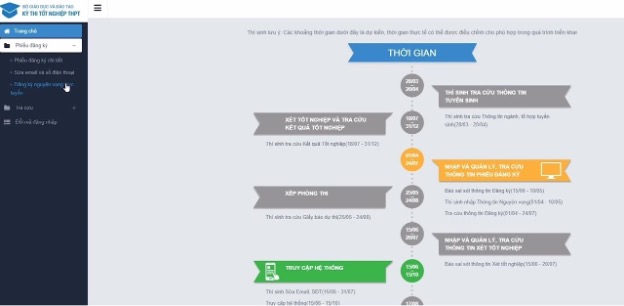
<p style="font-weight: 400; text-align: justify;"><span style="font-size:16px;">Thay vì đăng ký nguyện vọng trực tiếp trên phiếu như những năm trước. Năm 2022, các thí sinh thực hiện đăng ký nguyện vọng hoàn toàn bằng hình thức trực tuyến.</span></p>

<p style="font-weight: 400; text-align: justify;"><span style="font-size:16px;"><strong>Các học sinh lớp 12</strong>&nbsp;tại các trường phổ thông sẽ được trường cấp tài khoản (là số Căn cước công dân hoặc Chứng minh nhân dân, viết tắt: CCCD/CMND; trường hợp thí sinh không có CCCD/CMND thì sẽ sử dụng mã số định danh do cơ quan Công an cấp để thay thế) và mật khẩu để truy cập hệ thống Quản lý thi (QLT).</span></p>

<p style="font-weight: 400; text-align: justify;"><span style="font-size:16px;">Đối với thí sinh tự do, sau khi nộp phiếu Đăng ký dự thi (ĐKDT) sẽ được đơn vị ĐKDT cấp tài khoản &nbsp;và mật khẩu để đăng nhập vào hệ thống QLT.</span></p>

<p style="font-weight: 400; text-align: justify;"><span style="font-size:16px;">Thông tin đăng nhập bao gồm:&nbsp;<strong>Tài khoản đăng nhập (dãy số CMND/CCCD của thí sinh), mật khẩu đăng nhập.</strong></span></p>

<p style="font-weight: 400; text-align: justify;"><span style="font-size:16px;"><strong><em>Lưu ý:</em></strong><em>&nbsp;Thí sinh cần chú ý bảo mật thông tin tài khoản, mật khẩu đăng nhập. Sau khi nhận tài khoản đăng nhập, thí sinh nên thay đổi mật khẩu ngay để bảo mật thông tin. Trong trường hợp thí sinh quên tài khoản và mật khẩu thì có thể liên hệ Đơn vị ĐKDT để được cấp lại.</em></span></p>

<p style="font-weight: 400; text-align: justify;"><span style="font-size:16px;">Các bước đăng ký nguyện vọng trực tuyến:</span></p>

<p style="font-weight: 400; text-align: justify;"><span style="font-size:16px;"><strong>Bước 1: Đăng nhập&nbsp;</strong></span></p>

<p style="font-weight: 400; text-align: justify;"><span style="font-size:16px;">–&nbsp;<strong>Truy cập vào website:&nbsp;</strong><a href="http://thisinh.thitotnghiepthpt.edu.vn/">thisinh.thitotnghiepthpt.edu.vn</a></span></p>

<p style="font-weight: 400; text-align: justify;"><span style="font-size:16px;">–&nbsp;<strong>Tên đăng nhập:&nbsp;</strong>Số CMND/CCCD/Mã định danh</span></p>

<p style="font-weight: 400; text-align: justify;"><span style="font-size:16px;"><strong>– Mật khẩu:&nbsp;</strong>Mật khẩu để đăng nhập Hệ thống của thí sinh là mật khẩu được cấp khi đăng ký dự thi, trường hợp đã thay đổi mật khẩu sau khi được cấp thì dùng mật khẩu đã thay đổi.&nbsp;Thí sinh đăng nhập vào Hệ thống như sau:</span></p>

<div style="text-align:center"><img alt="" class="alignnone wp-image-26339" height="312" src="https://bdu.edu.vn/uploads/news/2022_07/picture2.png" width="704" /></div>

<p style="font-weight: 400; text-align: justify;"><span style="font-size:16px;"><strong>Bước 2: Truy cập chức năng Đăng ký nguyện vọng trực tuyến</strong></span></p>

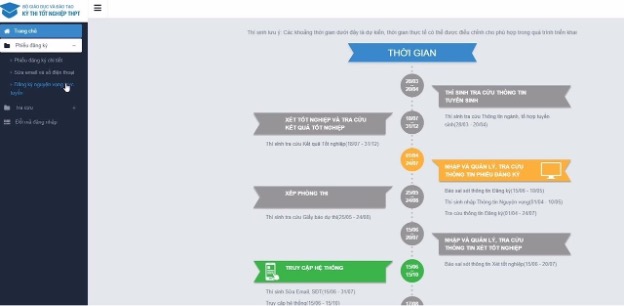
<p style="font-weight: 400; text-align: justify;"><span style="font-size:16px;">– Thí sinh vào phần&nbsp;<strong>“Phiếu đăng ký”</strong>, truy cập mục&nbsp;<strong>“Đăng ký nguyện vọng trực tuyến”</strong>.</span></p>

<div style="text-align:center"><img alt="Picture3" class="alignnone wp-image-26340" height="306" src="https://bdu.edu.vn/uploads/news/2022_07/picture3.jpg" width="624" /></div>

<p style="font-weight: 400; text-align: center;"><span style="font-size:16px;"><span style="color: rgb(51, 102, 255);">Truy cập mục “Đăng ký nguyện vọng trực tuyến”</span></span></p>

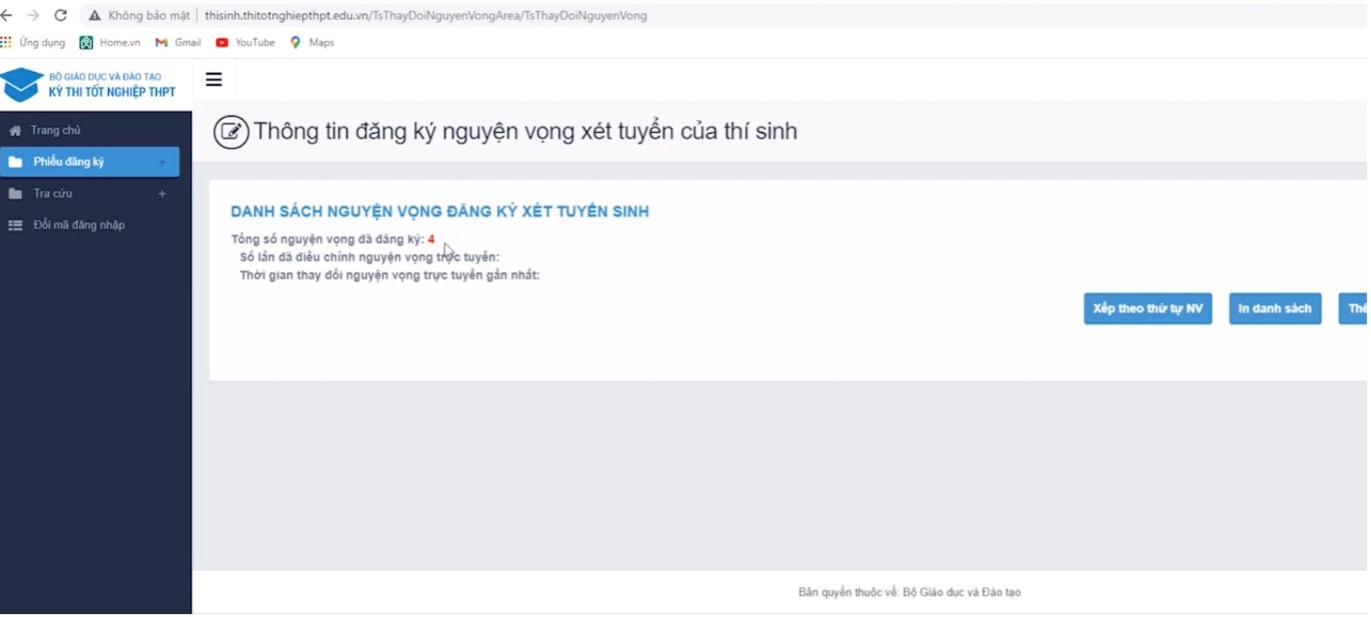
<div style="text-align:center"><img alt="" class="alignnone size-full wp-image-26341" height="617" src="https://bdu.edu.vn/uploads/news/2022_07/picture4.jpg" width="1371" /></div>

<p style="font-weight: 400; text-align: center;"><span style="font-size:16px;"><span style="color: rgb(51, 102, 255);">Nếu thí sinh tick chọn Đăng ký nguyện vọng trực tuyến, màn hình hệ thống sẽ xuất hiện các thông tin như sau</span></span></p>

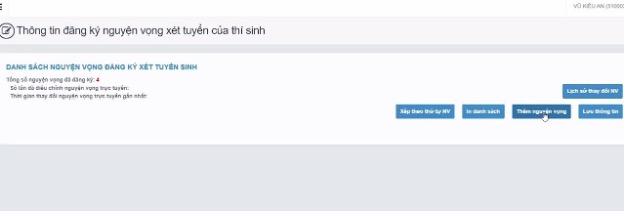
<p style="font-weight: 400; text-align: justify;"><span style="font-size:16px;">Để bổ sung thêm nguyện vọng, thí sinh bấm nút&nbsp;<strong>“Thêm nguyện vọng”</strong></span></p>

<div style="text-align:center"><img alt="Picture5" class="alignnone wp-image-26342" height="239" src="https://bdu.edu.vn/uploads/news/2022_07/picture5.jpg" width="704" /></div>

<p style="font-weight: 400; text-align: center;"><span style="font-size:16px;"><span style="color: rgb(51, 102, 255);"><em>Thí sinh có thể bấm “Thêm nguyện vọng”.</em></span></span></p>

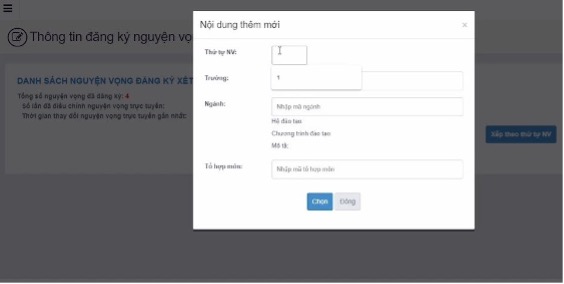
<p style="font-weight: 400; text-align: justify;"><span style="font-size:16px;">Bảng thêm mới nguyện vọng hiện lên, thí sinh&nbsp;nhập các thông tin:&nbsp;<strong>Thứ tự nguyện vọng, mã trường, ngành, tổ hợp môn</strong>&nbsp;vào của sổ thêm mới.</span></p>

<div style="text-align:center"><img alt="Picture6" class="alignnone wp-image-26343" height="305" src="https://bdu.edu.vn/uploads/news/2022_07/picture6.jpg" width="724" /></div>

<p style="font-weight: 400; text-align: center;"><span style="font-size:16px;"><span style="color: rgb(51, 102, 255);"><em>Nhập thông tin như thứ tự nguyện vọng, mã trường, mã ngành, tổ hợp môn.</em></span></span></p>

<p style="font-weight: 400; text-align: justify;"><span style="font-size:16px;"><strong>Bước 3: In danh sách nguyện vọng trước khi thay đổi&nbsp;</strong></span></p>

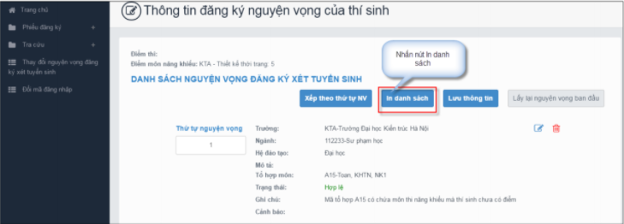
<p style="font-weight: 400; text-align: justify;"><span style="font-size:16px;">– Thí sinh nhấn nút&nbsp;<strong>“In danh sách”</strong>&nbsp;trên màn hình để in danh sách nguyện vọng:</span></p>

<div style="text-align:center"><img alt="Picture7" class="alignnone wp-image-26344" height="266" src="https://bdu.edu.vn/uploads/news/2022_07/picture7.png" width="726" /></div>

<p style="font-weight: 400; text-align: justify;"><span style="font-size:16px;"><strong>Bước 4: Thay đổi nguyện vọng</strong></span></p>

<p style="font-weight: 400; text-align: justify;"><span style="font-size:16px;"><strong>Lưu ý:&nbsp;</strong><em>Thí sinh có thể thực hiện một trong các thao tác: Sắp xếp lại thứ tự nguyện vọng hoặc Xóa, Sửa, Thêm mới nguyện vọng.</em></span></p>

<p style="font-weight: 400; text-align: justify;"><span style="font-size:16px;"><strong><em>Bước 4.1 Thay đổi thứ tự nguyện vọng&nbsp;</em></strong></span></p>

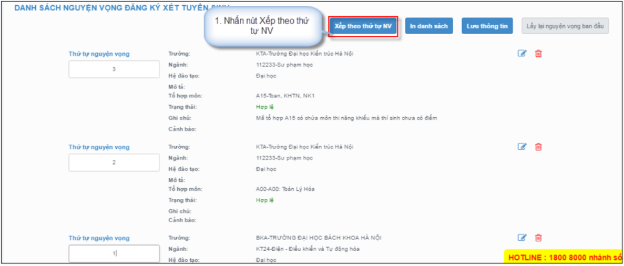
<p style="font-weight: 400; text-align: justify;"><span style="font-size:16px;">– Để thay đổi thứ tự nguyện vọng, thí sinh nhập thứ tự nguyện vọng vào ô thứ tự nguyện vọng (ví dụ như hình bên dưới thí sinh muốn thay đổi thứ tự nguyện vọng 3 thành nguyện vọng 1, nguyện vọng 1 thành nguyện vọng 3):</span></p>

<div style="text-align:center"><img alt="" class="alignnone wp-image-26345" height="291" src="https://bdu.edu.vn/uploads/news/2022_07/picture8.png" width="716" /></div>

<p style="font-weight: 400; text-align: justify;"><span style="font-size:16px;">– Sau đó nhấn nút&nbsp;<strong>“Xếp theo thứ tự NV”</strong>&nbsp;để sắp xếp theo thứ tự nguyện vọng tăng dần từ nguyện vọng thứ 1 đến thứ tự nguyện vọng cuối cùng của thí sinh:</span></p>

<div style="text-align:center"><img alt="Picture9" class="alignnone wp-image-26346" height="304" src="https://bdu.edu.vn/uploads/news/2022_07/picture9.png" width="718" /></div>

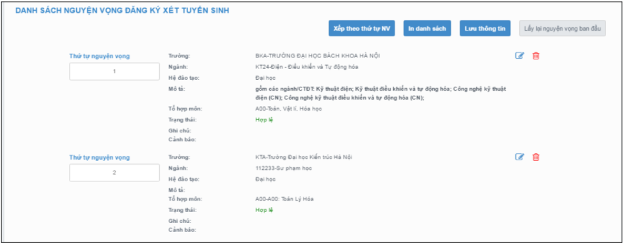
<p style="font-weight: 400; text-align: justify;"><span style="font-size:16px;">– Sau khi nhấn nút Xếp theo thứ tự NV, hệ thống sẽ thực hiện sắp xếp lại theo thứ tự tăng dần như sau:</span></p>

<div style="text-align:center"><img alt="Picture10" class="alignnone wp-image-26347" height="275" src="https://bdu.edu.vn/uploads/news/2022_07/picture10.png" width="708" /></div>

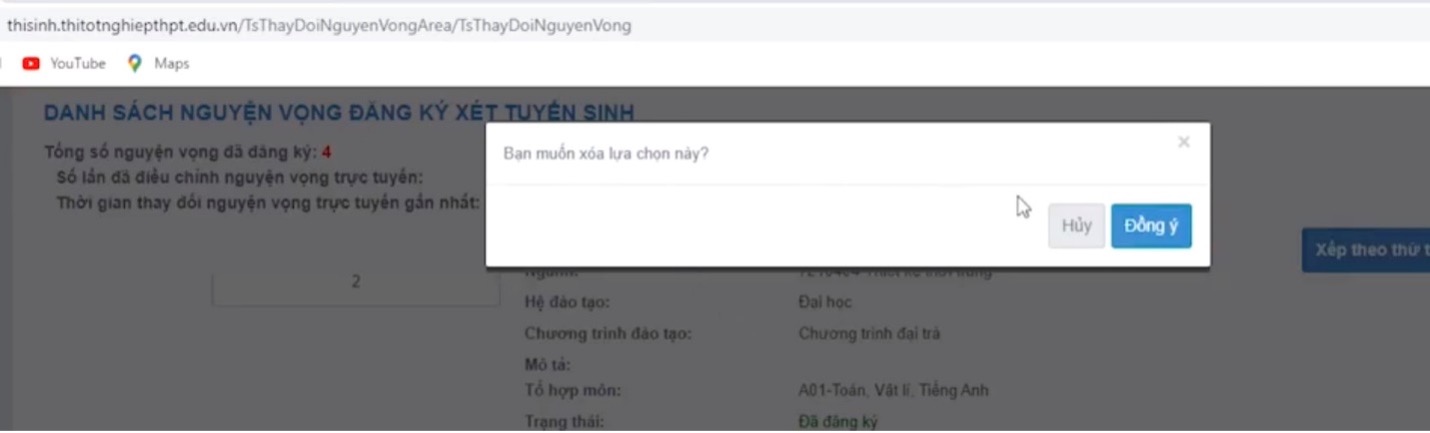
<p style="font-weight: 400; text-align: justify;"><span style="font-size:16px;"><strong><em>Bước 4.2: Xóa nguyện vọng&nbsp;</em></strong></span></p>

<p style="font-weight: 400; text-align: justify;"><span style="font-size:16px;">– Để xóa 1 nguyện vọng, thí sinh nhấn chuột vào biểu tượng “<strong>Thùng rác màu đỏ</strong>” của nguyện vọng đó:</span></p>

<div style="text-align:center"><img alt="Picture17" class="alignnone wp-image-26354" height="257" src="https://bdu.edu.vn/uploads/news/2022_07/picture17.png" width="713" /></div>

<p style="font-weight: 400; text-align: justify;"><span style="font-size:16px;">– Trên màn hình hiển thị cửa sổ xác nhận xóa, thí sinh nhấn nút&nbsp;<strong>“Đồng ý”</strong>&nbsp;để xác nhận xóa nguyện vọng này ra khỏi Danh sách nguyện vọng đăng ký xét tuyển sinh hiện có:</span></p>

<div style="text-align:center"><img alt="Picture12" class="alignnone size-full wp-image-26349" height="433" src="https://bdu.edu.vn/uploads/news/2022_07/picture12.jpg" width="1430" /></div>

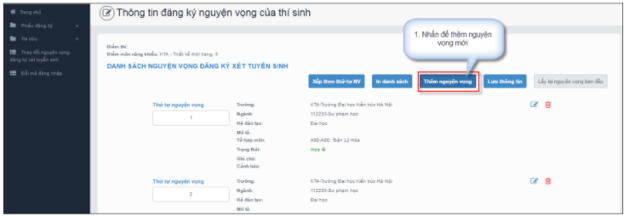
<p style="font-weight: 400; text-align: justify;"><span style="font-size:16px;"><strong><em>Bước 4.3: Thêm mới nguyện vọng</em></strong></span></p>

<p style="font-weight: 400; text-align: justify;"><span style="font-size:16px;"><strong>Lưu ý:&nbsp;</strong><em>Nút Thêm nguyện vọng chỉ hiển thị khi tổng số nguyện vọng hiện có nhỏ hơn tổng số nguyện vọng thí sinh đã đăng ký ban đầu khi nộp hồ sơ đăng ký dự thi.&nbsp;</em></span></p>

<p style="font-weight: 400; text-align: justify;"><span style="font-size:16px;">– Để thêm mới 1 nguyện vọng, thí sinh nhấn nút&nbsp;<strong>“Thêm nguyện vọng”</strong>&nbsp;trên màn hình:</span></p>

<div style="text-align:center"><img alt="Picture13" class="alignnone wp-image-26350" height="266" src="https://bdu.edu.vn/uploads/news/2022_07/picture13.png" width="727" /></div>

<p style="font-weight: 400; text-align: justify;"><span style="font-size:16px;">– Thí sinh nhập thông tin nguyện vọng trong hình sau:</span></p>

<div style="text-align:center"><img alt="Picture14" class="alignnone wp-image-26351" height="350" src="https://bdu.edu.vn/uploads/news/2022_07/picture14.png" width="752" /></div>

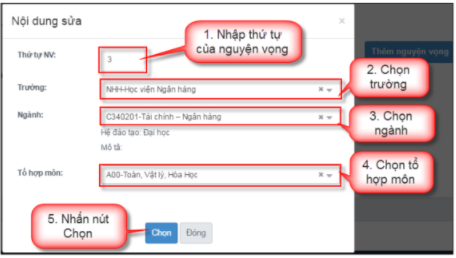
<p style="font-weight: 400; text-align: justify;"><span style="font-size:16px;"><strong><em>Bước 4.4: Sửa nguyện vọng&nbsp;</em></strong></span></p>

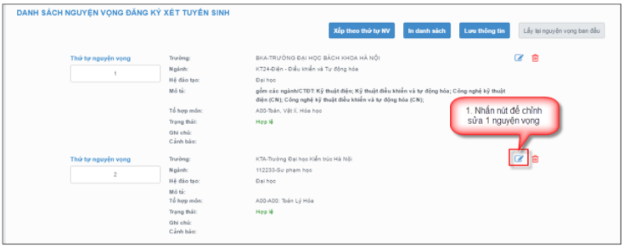
<p style="font-weight: 400; text-align: justify;"><span style="font-size:16px;">– Để sửa 1 nguyện vọng trong danh sách nguyện vọng, thí sinh nhấn biểu tượng “<strong>Hình bút chì</strong>” của nguyện vọng đó:</span></p>

<p style="font-weight: 400; text-align: justify;"><span style="font-size:16px;">– Thí sinh nhập thông tin nguyện vọng như trong hình sau:</span></p>

<div style="text-align:center"><img alt="Picture15" class="alignnone wp-image-26352" height="279" src="https://bdu.edu.vn/uploads/news/2022_07/picture15.png" width="724" /></div>

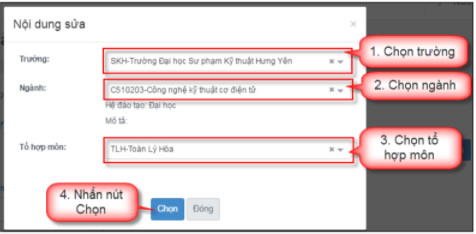
<p style="font-weight: 400; text-align: justify;"><span style="font-size:16px;">– Trên màn hình sửa nguyện vọng, thí sinh chọn trường, chọn ngành, chọn tổ hợp môn nếu muốn thay đổi và nhấn nút Chọn:</span></p>

<div style="text-align:center"><img alt="Picture16" class="alignnone wp-image-26353" height="311" src="https://bdu.edu.vn/uploads/news/2022_07/picture16.png" width="707" /></div>

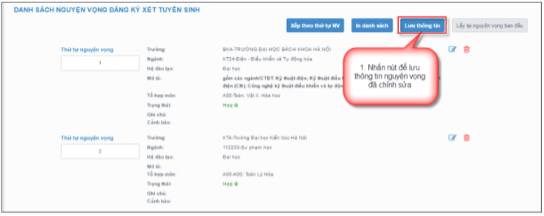
<p style="font-weight: 400; text-align: justify;"><span style="font-size:16px;"><strong>Bước 5: Lưu thông tin&nbsp;</strong></span></p>

<p style="font-weight: 400; text-align: justify;"><span style="font-size:16px;">– Sau khi đã điều chỉnh thông tin nguyện vọng, thí sinh nhấn nút&nbsp;<strong>“Lưu thông tin”&nbsp;</strong></span></p>

<div style="text-align:center"><img alt="Picture17" class="alignnone wp-image-26354" height="316" src="https://bdu.edu.vn/uploads/news/2022_07/picture17.png" width="759" /></div>

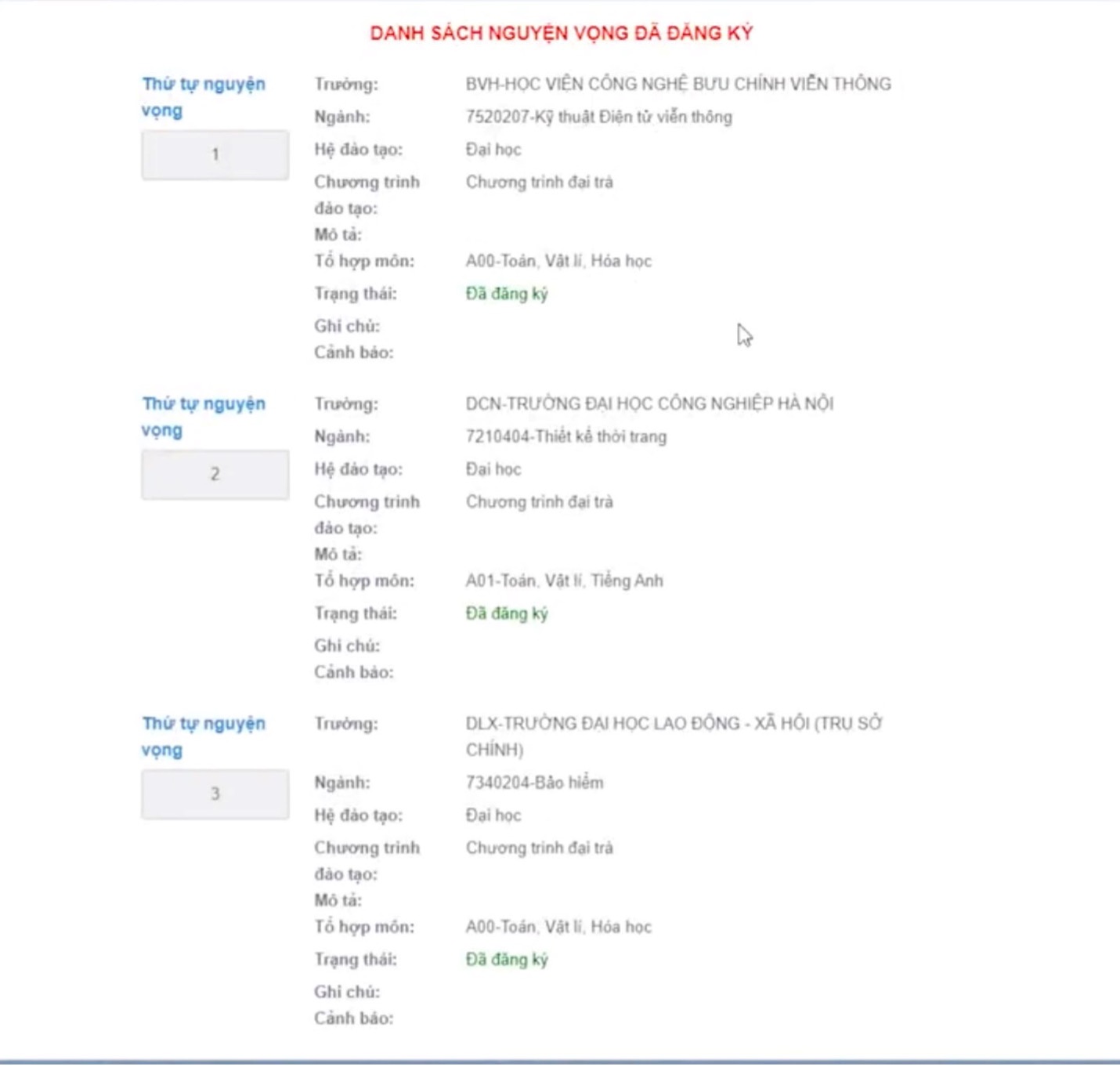
<p style="font-weight: 400; text-align: justify;"><span style="font-size:16px;">Hệ thống hiển thị&nbsp;<strong>Danh sách nguyện vọng đã đăng ký</strong>&nbsp;để thí sinh xác nhận</span></p>
<span style="font-size:16px;"><img alt="" class="alignnone size-full wp-image-26355" height="1362" src="https://bdu.edu.vn/uploads/news/2022_07/picture18.jpg" width="1430" /></span>

<p style="font-weight: 400; text-align: justify;"><span style="font-size:16px;">Thí sinh bấm nút&nbsp;<strong>Xác nhận đăng ký</strong>, thông tin nguyện vọng sẽ được hệ thống lưu lại, hệ thống sẽ mất vài phút để kiểm tra và cập nhật dữ liệu.</span></p>
<span style="font-size:16px;"> <img alt="" class="alignnone size-full wp-image-26356" height="1316" src="https://bdu.edu.vn/uploads/news/2022_07/picture19.jpg" width="1430" /></span>

<p style="font-weight: 400; text-align: justify;"><span style="font-size:16px;">Sau khi hệ thống xác nhận, thí sinh có thể thay đổi các nguyện vọng nếu thời gian đăng ký vẫn còn.</span></p>
<span style="font-size:16px;"> <img alt="" class="alignnone size-full wp-image-26357" height="770" src="https://bdu.edu.vn/uploads/news/2022_07/picture20.jpg" width="1430" /></span>

<p style="font-weight: 400; text-align: center;"><span style="font-size:16px;"><span style="color: rgb(51, 102, 255);"><em>Màn hình hiển thị sau khi hệ thống ghi nhận yêu cầu thay đổi nguyện vọng</em></span></span></p>

<p style="font-weight: 400; text-align: justify;"><span style="font-size:16px;"><strong>Bước 6: Kiểm tra thông tin điều chỉnh nguyện vọng đăng ký xét tuyển&nbsp;</strong></span></p>

<p style="font-weight: 400; text-align: justify;"><span style="font-size:16px;">– Sau khi thí sinh đã điều chỉnh nguyện vọng đăng ký xét tuyển<strong>&nbsp;</strong>thành công, thoát khỏi chức năng&nbsp;điều chỉnh nguyện vọng đăng ký xét tuyển và Hệ thống.</span></p>

<p style="font-weight: 400; text-align: justify;"><span style="font-size:16px;">– Đó đăng nhập lại Hệ thống, vào chức năng Đăng ký nguyện vọng trực tuyến.</span></p>

<p style="font-weight: 400; text-align: justify;"><span style="font-size:16px;">– Vào trang thông tin nguyện vọng, thí sinh thực hiện In danh sách nguyện&nbsp;vọng sau khi điều chỉnh và lưu lại:</span></p>
<span style="font-size:16px;"> </span>

<div style="text-align:center"><img alt="" class="alignnone wp-image-26358" height="396" src="https://bdu.edu.vn/uploads/news/2022_07/picture21.png" width="761" /></div>

<p style="font-weight: 400; text-align: justify;"><span style="font-size:16px;"><strong><u>Lưu ý:</u></strong></span></p>

<p style="font-weight: 400; text-align: justify;"><span style="font-size:16px;">– Để việc điều chỉnh nguyện vọng đăng ký xét tuyển thành công, thí sinh phải thực hiện điều chỉnh nguyện vọng đăng ký xét tuyển đầy đủ các bước, không được bỏ qua hoặc dừng lại khi chưa thực hiện xong bước cuối cùng.</span></p>

<p style="font-weight: 400; text-align: justify;"><span style="font-size:16px;">–&nbsp;Thời gian hiện trong ảnh là thời gian của các năm điều chỉnh trước đó.</span></p>

<p style="font-weight: 400; text-align: justify;"><span style="font-size:16px;"><em>(Nguồn: Bộ Giáo dục và Đào tạo)</em></span></p>

<p style="font-weight: 400; text-align: justify;"><span style="font-size:16px;"><em>Phú Điền – Mỹ Nương, Ban CĐCTCL</em></span></p>

<p style="font-weight: 400; text-align: justify;">&nbsp;</p>
		</div>
	</div>
	<div id="footer" class="clearfix">
		<div id="url">
			<strong>URL của bản tin này: </strong><a href="https://bdu.edu.vn/thong-bao/huong-dan-2k4-cach-dang-ky-nguyen-vong-xet-tuyen-dai-hoc-truc-tuyen-616.html" title="Hướng dẫn 2k4 cách đăng ký nguyện vọng xét tuyển đại học trực tuyến">https://bdu.edu.vn/thong-bao/huong-dan-2k4-cach-dang-ky-nguyen-vong-xet-tuyen-dai-hoc-truc-tuyen-616.html</a>

		</div>
		<div class="clear"></div>
		<div class="copyright">
			&copy; Trường Đại học Bình Dương
		</div>
		<div id="contact">
			<a href="mailto:info@bdu.edu.vn">info@bdu.edu.vn</a>
		</div>
	</div>
</div>
        <div id="timeoutsess" class="chromeframe">
            Bạn đã không sử dụng Site, <a onclick="timeoutsesscancel();" href="https://bdu.edu.vn/#">Bấm vào đây để duy trì trạng thái đăng nhập</a>. Thời gian chờ: <span id="secField"> 60 </span> giây
        </div>
        <div id="openidResult" class="nv-alert" style="display:none"></div>
        <div id="openidBt" data-result="" data-redirect=""></div>
<div id="run_cronjobs" style="visibility:hidden;display:none;"><img alt="" src="/index.php?second=cronjobs&amp;p=z15IGLj9" width="1" height="1" /></div>
<script src="https://bdu.edu.vn/assets/js/jquery/jquery.min.js"></script>
<script>var nv_base_siteurl="/",nv_lang_data="vi",nv_lang_interface="vi",nv_name_variable="nv",nv_fc_variable="op",nv_lang_variable="language",nv_module_name="news",nv_func_name="savefile",nv_is_user=0, nv_my_ofs=-4,nv_my_abbr="EDT",nv_cookie_prefix="nv4",nv_check_pass_mstime=1738000,nv_area_admin=0,nv_safemode=0,theme_responsive=1,nv_is_recaptcha=0;</script>
<script src="https://bdu.edu.vn/assets/js/language/vi.js"></script>
<script src="https://bdu.edu.vn/assets/js/global.js"></script>
<script src="https://bdu.edu.vn/themes/phubinh_theme/js/news.js"></script>
<script src="https://bdu.edu.vn/themes/phubinh_theme/js/main.js"></script>
<script>
			function openNav() {
			  document.getElementById("mySidepanel").style.width = "250px";
			}

			function closeNav() {
			  document.getElementById("mySidepanel").style.width = "0";
			}
		</script>
<script src="https://bdu.edu.vn/themes/phubinh_theme/js/bootstrap.min.js"></script>
</body>
</html>